
Taskade Review 2026: The Most Powerful Productivity Tool?
Are you struggling to keep your team organized, projects on track, and communication flowing seamlessly across multiple tools? The fragmentation of tasks, notes, and communication can quickly derail even the most well-intentioned projects. This is a common pain point for many businesses and individuals seeking a unified solution.
In this comprehensive Taskade Review, we dive deep into a platform designed to solve these very challenges, offering an all-in-one workspace for tasks, notes, and team collaboration.
Quick Verdict
Taskade stands out as an incredibly versatile and intuitive AI-powered workspace, perfect for small to medium-sized teams and individuals who value visual organization, real-time collaboration, and integrated AI assistance. In our experience, it offers excellent value for money, especially given its robust feature set and generous free plan. If you’re looking to consolidate your productivity tools into one powerful hub, Taskade is absolutely worth considering.
What is Taskade?
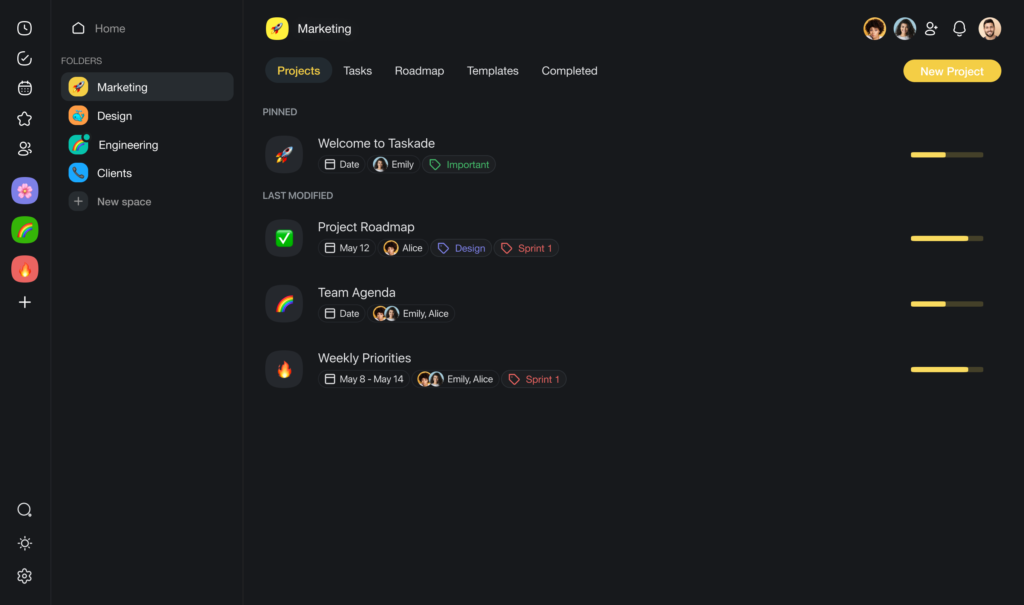
Taskade is an AI-powered collaborative workspace that unifies task management, note-taking, project planning, and team communication into a single, flexible platform. It allows users to organize projects with dynamic views like task lists, Kanban boards, mind maps, and organizational charts, all in real-time. Designed to boost team productivity, Taskade aims to simplify workflows and enhance collaboration, making it ideal for everything from personal task management to complex team projects.
Key Features
Our Taskade review wouldn’t be complete without highlighting its standout features that truly make a difference.
AI-Powered Assistant
Taskade’s integrated AI assistant is a game-changer for brainstorming, content generation, and task breakdown. It can help you generate ideas, write meeting agendas, summarize documents, or even create entire project outlines in seconds. This significantly reduces the time spent on manual setup and allows teams to jump straight into productive work. We found this feature particularly useful for overcoming creative blocks.
Dynamic Project Views
One of Taskade’s core strengths is its flexibility in how you visualize your work. You can instantly switch between various project views including:
- List View: For simple checklists and task tracking.
- Board View (Kanban): Ideal for agile project management and visualizing workflows.
- Mind Map View: Excellent for brainstorming and organizing ideas visually.
- Org Chart View: To structure hierarchies and team roles.
- Action View: For tracking tasks with due dates and assignments.
This adaptability ensures that every team member can work in a way that suits their preferences, all within the same project.
Real-Time Collaboration
Taskade is built for collaboration from the ground up. Teams can co-edit documents, chat, video conference, and assign tasks in real-time within any project. This eliminates the need for switching between multiple communication and project management tools. Our Taskade review found that this seamless integration fosters greater team cohesion and efficiency.
Customizable Templates
Taskade offers a vast library of templates for various use cases—from marketing campaigns and product roadmaps to personal goal setting and meeting notes. You can also create and share your own custom templates. This feature helps teams get started quickly and maintain consistency across projects.
Pricing Analysis
Is there a Free Plan? Yes, Taskade offers a very generous free plan that includes unlimited workspaces, projects, and tasks, alongside essential collaboration features. This is fantastic for individuals or small teams just starting out.
Compared to the market, Taskade’s paid plans are competitively priced. The “Unlimited” plan unlocks advanced features like expanded AI usage, priority support, and custom branding, making it a cost-effective solution for growing teams. Our Taskade Review concludes that the value provided far outweighs the cost, especially considering the breadth of features included.
Comparison: Taskade vs Notion
Both Taskade and Notion are powerful all-in-one workspaces, but they cater to slightly different needs.
- Choose Taskade if: You prioritize real-time collaboration with integrated video conferencing and chat, appreciate a more visually guided and intuitive interface with dynamic project views (especially Mind Maps), and want a powerful AI assistant baked directly into your workflow for brainstorming and content generation. Our Taskade review emphasizes its ease of use for quick team onboarding.
- Choose Notion if: You need extreme customization for databases and complex knowledge bases, prefer a highly modular block-based system for building pages, and are comfortable with a steeper learning curve for maximum flexibility.
💡 Pro Tip: While Taskade is amazing for organizing ideas, its AI writer is meant for short notes. If you need to write long SEO blog posts, we still recommend integrating it with a dedicated writer like Jasper AI.
PROS AND CONS
Our extensive Taskade Review highlights its strengths and areas for improvement:
STEP-BY-STEP (How to use)
Getting started with Taskade and achieving your first result is straightforward. Here’s a quick guide:
- Sign Up & Create a Workspace: Visit the Taskade website and sign up for a free account. You’ll be prompted to create your first workspace, which can be for a team, department, or personal use.
- Start a New Project: Within your workspace, click “New Project.” You can choose from a template (e.g., “Daily Planner,” “Meeting Agenda,” “Product Roadmap”) or start from scratch.
- Add Tasks & Notes: Begin typing your tasks, ideas, or notes directly into the project. Use markdown for formatting, and hit Enter to create new items.
- Switch Views: Experiment with the different views (List, Board, Mind Map) by clicking the icons at the top of your project. This is a key part of the Taskade review experience, allowing you to visualize your work differently.
- Collaborate: Invite team members to your project via email or a shareable link. You can assign tasks, leave comments, and even start a video call directly within the project.
FAQ
Q: Is Taskade Free?
A: Yes, Taskade offers a comprehensive free plan that includes unlimited workspaces, projects, and tasks, making it an excellent option for individuals and small teams. Paid plans unlock advanced features and increased usage limits.
Q: Is Taskade secure for team collaboration?
A: Yes, Taskade employs industry-standard security measures, including SSL encryption for data in transit and encryption at rest, to protect user data and ensure secure team collaboration. You can find more details on their official website.
Q: What are the best alternatives to Taskade?
A: Popular alternatives include Notion, Asana, Trello, and ClickUp. Each offers unique strengths, but Taskade stands out for its integrated AI, dynamic views, and real-time collaboration features.
FINAL VERDICT
Our comprehensive Taskade Review confirms its position as a truly powerful and intuitive all-in-one workspace. For teams and individuals seeking to streamline their workflow, enhance collaboration, and leverage AI for increased productivity, Taskade offers an exceptional solution. Its blend of flexible project views, real-time communication, and intelligent assistance makes it a formidable contender in the productivity software landscape. If you’re tired of juggling multiple tools and want a unified, efficient platform, Taskade is an outstanding choice.
Ready to transform your productivity? Try Taskade for free today!